Open WebUI, reachable via the same tunnel, was confirmed still working from a phone after the restart — the existing routes weren't disturbed by adding the third.
How to read the margin
- Verified
- Confirmed by direct output, not assumed.
- Open
- A working hypothesis or a queued check. Not yet established.
- Judgement
- A choice made deliberately, where a different setup could reasonably choose otherwise.
Goal
The inference machine (ai-lab-b) already has SSH access for debugging work, routed through a Cloudflare Tunnel to avoid forwarding ports on a network outside the lab's control. Graphical access was the next ask — RDP, not just a terminal — for a collaborator doing debugging work who needed the actual Windows desktop, not a shell.
Forwarding TCP 3389 through the router was the obvious first idea and the first thing ruled out, for the same reason SSH doesn't use it: the network isn't under the lab's control. The existing tunnel, already carrying SSH (ssh.skyapt.org) and Open WebUI (lab.skyapt.org) traffic, looked like the natural place to add a third route.
Extending the existing tunnel
Before touching the Cloudflare Tunnel config, the working file was backed up (alongside an older backup from when SSH was first added). The ingress list going in was:
ingress:
  - hostname: lab.skyapt.org
    service: http://localhost:8080
  - hostname: ssh.skyapt.org
    service: ssh://localhost:22
  - service: http_status:404
A third rule was added for RDP:
  - hostname: rdp.skyapt.org
    service: rdp://localhost:3389
Validated cleanly (cloudflared tunnel ingress validate → OK), a DNS route was created for the new hostname, and the cloudflared service was restarted.
Verified
Enabling RDP on Windows
RDP was off by default on ai-lab-b (fDenyTSConnections registry value of 1). Flipped to 0, confirmed Windows was then listening on port 3389 on both interfaces, and enabled the built-in Remote Desktop Windows Firewall rule group — the shadow, user-mode TCP, and user-mode UDP inbound rules all came up allowed.
Building the Browser RDP application
Cloudflare Zero Trust's Browser RDP wizard was used to create an application pointed at the new rdp.skyapt.org hostname on port 3389. An access policy was set up restricted to a single allow-listed collaborator address, with browser clipboard text copy/paste enabled and file upload/download left off.
The wizard's target initially pointed at 127.0.0.1, which was wrong for a tunnel proxying traffic to the machine's own LAN address — corrected to the machine's actual LAN IP. A separate Cloudflare private-network route (a /32 CIDR pointed at the same address, through the same tunnel) was also created alongside it.
Judgement
Both the public-hostname target and the private-network CIDR route were left in place rather than picking one, since it wasn't yet clear which one Cloudflare's Browser RDP implementation actually depends on — see below.
Where it stopped
Browsing directly to the public hostname returned an error: no RDP target specified, select one from the App Launcher. Investigating that led into Cloudflare's Access App Launcher — enabling "show in App Launcher" on the application, adding a launcher-specific access policy — without producing a working session. The App Launcher kept reporting it needed to be enabled at the organization level.
Open
Best guess, not confirmed: Cloudflare's Browser RDP may treat a public-hostname route and a private-network/CIDR route as two different architectures, and this configuration may have mixed pieces of both without realizing it. Current Cloudflare documentation describes Browser RDP as available on free/Zero Trust tiers, so a plan limitation looks unlikely — but that's also not independently confirmed.
Rather than keep changing settings against an unclear architecture, further changes stopped here deliberately.
Current state
- Open WebUI via the existing tunnel hostname: still working
- Existing SSH route: unchanged
- New RDP hostname: DNS and tunnel ingress exist, validate cleanly
- Windows RDP: enabled, listening, firewall rules on
- Browser RDP application: exists, access policy in place for the one collaborator
- Target and a matching private-network route both point at the machine's LAN address
- Browser RDP session: not yet working
Update, 26 August: a working path, a different one
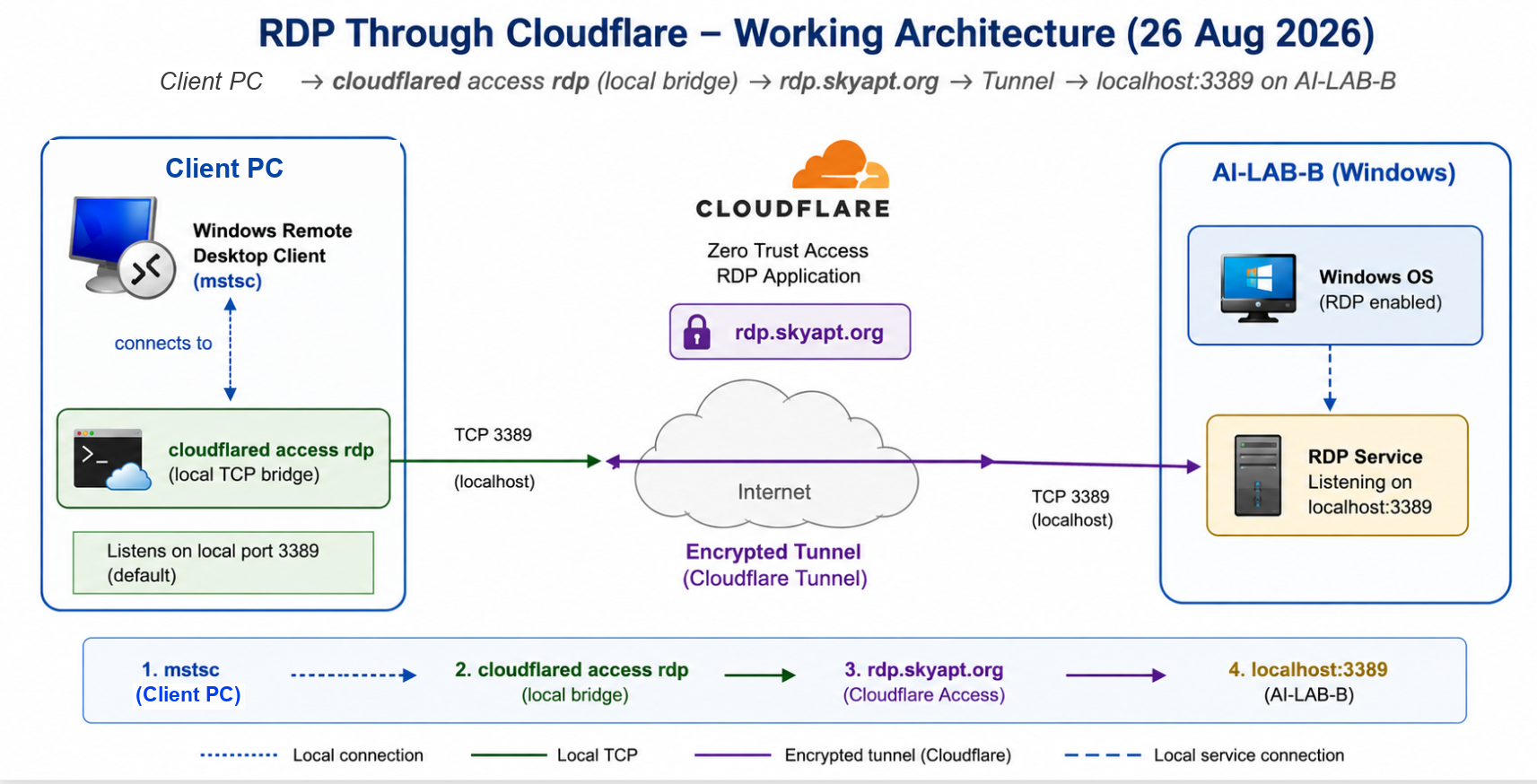
The Browser RDP/App Launcher path above was never resolved. A separate approach, tried two days later, works: instead of rendering RDP inside a browser tab, Cloudflare's own command-line client opens a local TCP bridge, and the normal Windows Remote Desktop client connects to that bridge rather than to the public hostname directly.
Client PC -> cloudflared access rdp (local bridge) -> rdp.skyapt.org -> Cloudflare Tunnel -> localhost:3389 on ai-lab-bcloudflared access rdp runs on the connecting machine and listens on local port 3389 by default. Windows Remote Desktop (mstsc) is pointed at that local listener, not at rdp.skyapt.org itself. Cloudflare Access authentication is presented when required; once past it, the ordinary Windows RDP login completes against the inference machine exactly as it would on a local network.
Verified
Windows RDP confirmed still enabled on the inference machine (fDenyTSConnections still 0). The Cloudflare bridge starts successfully; Windows Remote Desktop connects through it; the remote desktop was reached end to end. The bridge shuts down cleanly when the Remote Desktop session closes.
A small launcher script is being built around this sequence: start the bridge, open Remote Desktop full-screen with the account name pre-filled, prompt for the password, surface Cloudflare authentication if it's needed, then tear the bridge down again when the session ends. A manual run of the sequence reached the remote desktop successfully; the launcher itself is still a work in progress.
Judgement
The Browser RDP/App Launcher investigation above is being left exactly as it was written, as the historical troubleshooting record, rather than rewritten around this outcome. The two paths are genuinely different Cloudflare mechanisms — finding one working doesn't explain why the other didn't, and that question is still open if browser-only access is ever needed later.
Current state, updated
- RDP through Cloudflare: working, via the local bridge + native Remote Desktop client
- Windows RDP: still enabled, unchanged since 24 August
- A connection launcher script: prototyped, reached the remote desktop in a manual run, not yet finished
- Browser RDP / App Launcher: still not established, and no longer required for the immediate access goal