A watcher that stops running fails silently — files land in Downloads, never reach cc-sync, and nothing announces it. Mitigated by the heartbeat file and a retained manual sweep script.
How to read the margin
- Verified
- Confirmed in vendor documentation or measured on the lab's own hardware.
- Open
- A working assumption or a queued check. Not yet established.
- Judgement
- A choice made deliberately, where a different lab could reasonably choose otherwise.
- No tag
- Narrative or description, carrying no claim.
Architecture
The lab runs three Claude instances. CC1 orchestrates on a desktop PC. CC2 runs on the inference machine alongside the local models. CiC is a browser chat session that sees CC1 and CC2 only through files the human carries across.
This channel connects CiC to CC1 directly. CC2 reaches CiC only by routing through CC1 — see “SSH clipboard limitation” below. Automatic wake-up between CC1 and CC2 themselves is a separate, unbuilt piece of work (see Current Status).
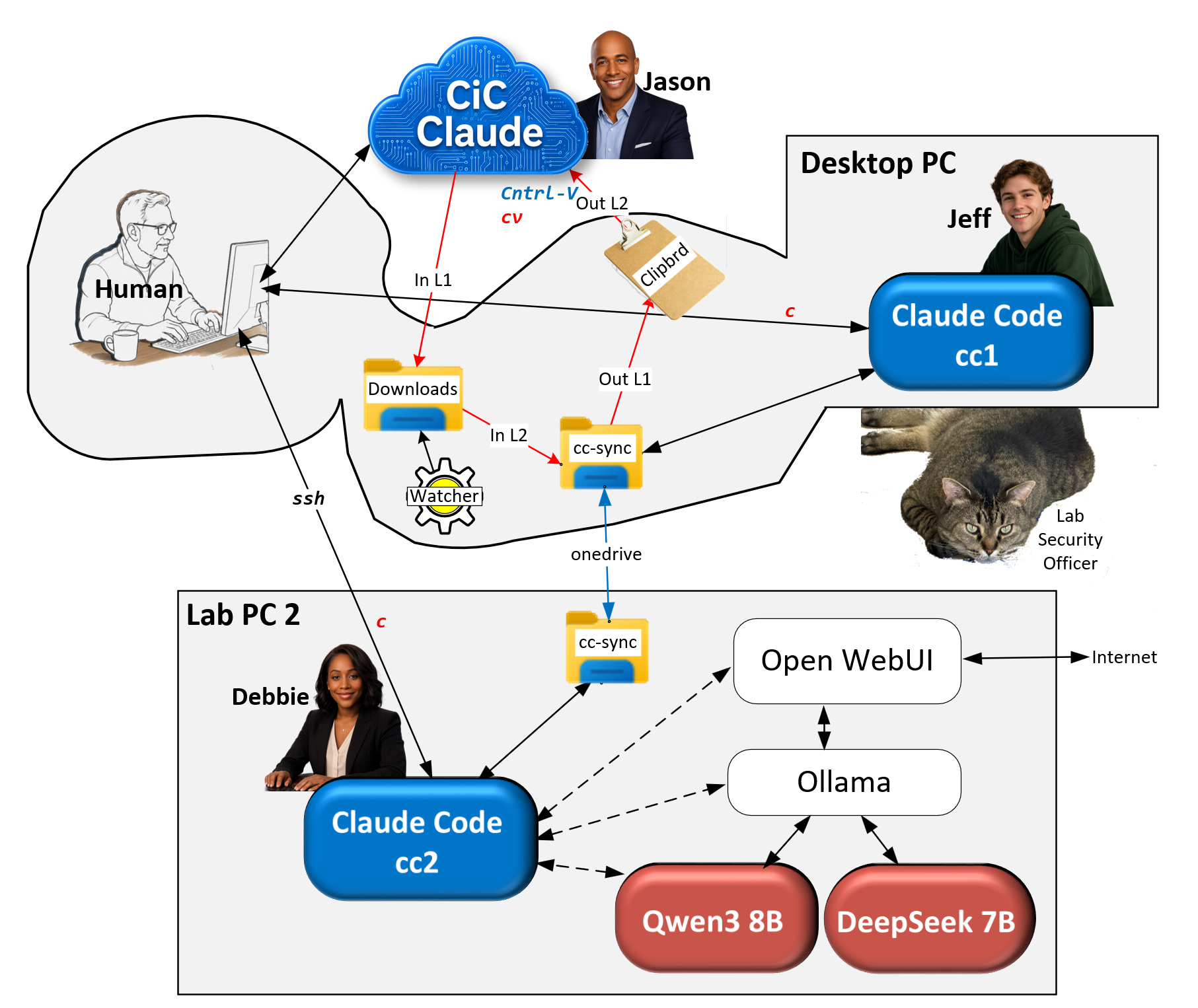
Inbound and outbound legs
Direction is named against cc-sync itself, not against whoever is speaking. Outbound means files leaving cc-sync for CiC. Inbound means files arriving into it.
Inbound is a background watcher on the desktop PC. It monitors the Downloads folder, copies matching files into cc-sync, writes the acknowledgement marker the other agents key off, raises a notification, and maintains a heartbeat file so its own liveness is observable.
Judgement
Outbound uses the bundler, Bundle-CCSync.ps1: a script that scans cc-sync for files added or changed since its last run and collapses them into a single Markdown file, cc-sync-export.md. By default it runs incrementally, tracking its own boundary between runs; a -Full mode re-bundles everything from scratch, and a -RebundleLast mode re-derives the previous batch without advancing the tracker, for recovery. It now also places that file on the clipboard as a file object — the same clipboard format a file manager produces — with a text fallback if the clipboard write fails.
Verified
Inbound tested with a 31 MB file and a deliberately slow direct write. Outbound tested with a 140-file, 1.7 MB bundle delivered intact — head, tail, and closing delimiter all present, no truncation. Clipboard contents were confirmed by an independent query after the write, not by the script’s own success message alone.
Signal-word convention
Outbound: CC1 runs the bundler, which loads the clipboard, then CC1 types cv into the chat. The human presses Ctrl+V.
Inbound: the human downloads a file from the chat; the watcher imports it into cc-sync; the cloud sync service carries it to the inference machine; CC2 reads it from its own copy of cc-sync.
Verified
cv is typed by CC1 after reading the bundler’s own console output confirming clipboard success — it is not emitted automatically by the script. The script’s own success/failure messages are gated on the clipboard write actually succeeding.
SSH clipboard limitation
CC2 cannot use the cv signal. cv means “the clipboard is loaded, press paste,” and paste reads the clipboard of the machine the browser is running on — the desktop PC. CC2 is reached over SSH, which does not share clipboards between machines.
Verified
If CC2 announced cv, the human would paste whatever the desktop’s clipboard last held — most likely a stale bundle from CC1. A real file, plausibly formatted, and wrong.
CC2’s route to CiC runs through CC1: CC2 writes into its own copy of cc-sync, the cloud sync service carries it to the desktop, and CC1 bundles it from there. CC2 uses a different signal word, cs (“cc-sync ready”), to ask CC1 to run an incremental bundle — never cv.
What is still not verified
The channel described above has been exercised in one direction between two participants. The third has been copied on everything and has confirmed nothing.
C1
Full circuit, chat session to inference node and back
A token travels out to the third agent and a derived value comes back. Derived, not copied — a copied token proves a file made the round trip without proving anyone read it.
C2
Cloud sync latency, both directions
Never measured. The shared folder is drawn as one object and is actually two, reconciled on a schedule nobody controls. Every estimate of how quickly a message reaches the second machine is currently a guess.
C3
Conflict-copy naming against duplicate detection
Duplicate detection normalises the suffix a browser adds to repeated downloads. A sync service names its conflicts differently. The same bug class, one format handled and one untested.
C4
Arrival signal for the third agent
It has no notification of any kind. It learns of messages when someone tells it to look. Unsolved rather than deferred.
Open
C1 and C2 will be measured in the same run. One trial gives a gut check, not a characterisation — sync timing varies with client state and recent activity, and a first message after an idle night is the honest worst case rather than anything measured during an active evening.
What was ruled out, and why
- Downloading straight into the shared folder
- Would remove a step. It would also drop every unrelated download into the agents’ message folder, and nothing would write the acknowledgement markers the protocol depends on.
- An always-loaded clipboard
- A background process could bundle on every change and keep the clipboard permanently primed, making the outbound leg a single keystroke. The clipboard is a shared global; the process would silently destroy whatever the human had copied. One keystroke is not worth that.
- Detecting whether a message was delivered
- The bundler cannot know whether a paste happened; there is no callback from a chat window. Any heuristic would be a guess presented as a fact, which is worse than the current honest limitation.
- Enforcing the readiness signal in code
- The signal is typed by an agent after reading its own console output, not emitted by the script. Automating it would remove the only independent check on the script’s self-report. The separation is the value.
Human-in-the-loop requirement
Both directions require a person. CiC cannot reach a filesystem, and no local event can deliver a message into a browser chat conversation. The channel reduces the human’s role in each leg to a keystroke or a paste; it does not remove it.
Judgement
Agents may exchange messages with each other freely, but anything that publishes — to the public site, the repository, or the test log — requires human approval first.