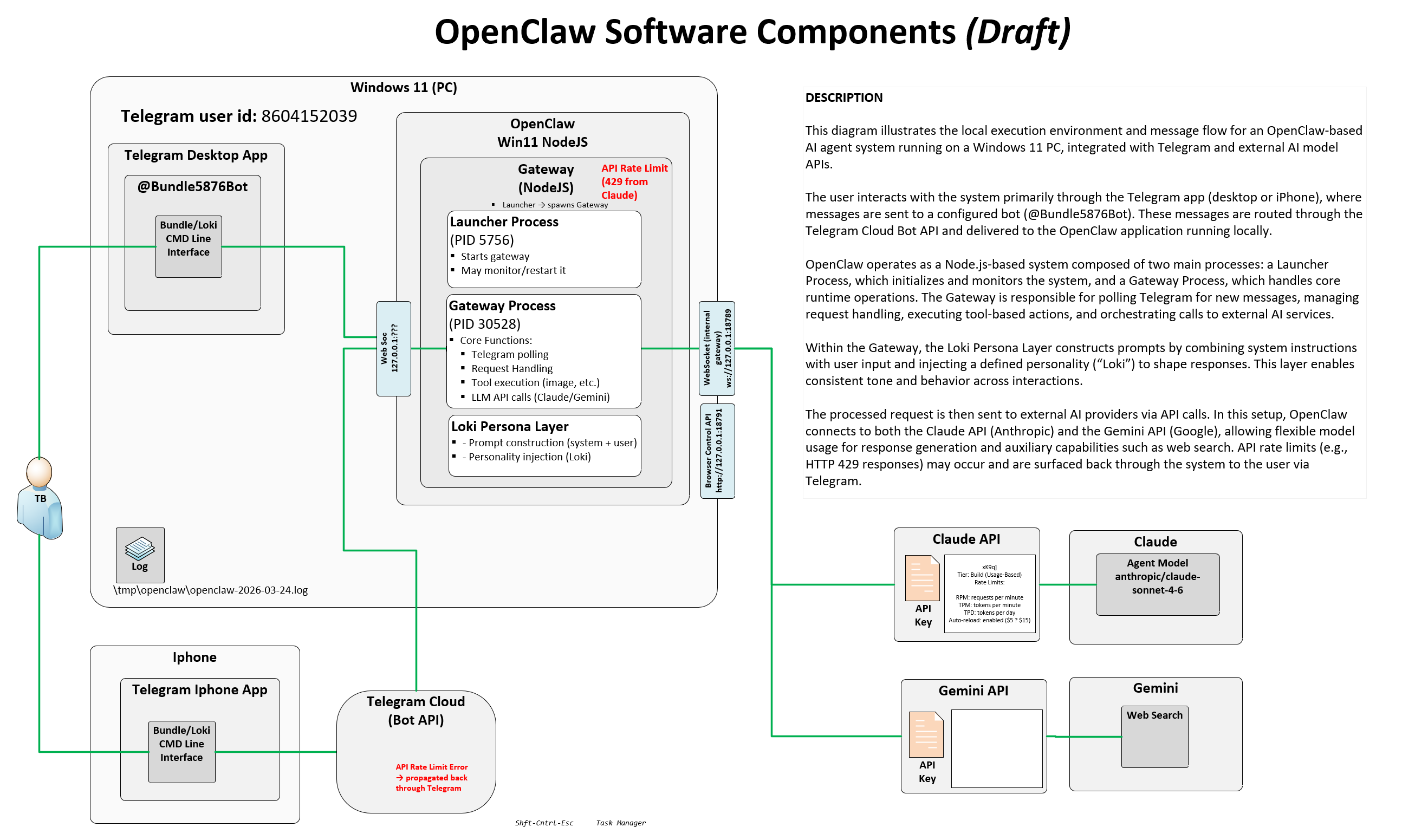
This diagram illustrates the local execution environment and message flow for an OpenClaw-based AI agent system running on a Windows 11 PC, integrated with Telegram and external AI model APIs.
The user interacts via the Telegram app (desktop or iPhone), sending messages to a configured bot (@Bundle5876Bot). Messages are routed through the Telegram Cloud Bot API and delivered to the OpenClaw application running locally.
OpenClaw is a Node.js-based system with two main processes: a Launcher Process that initializes and monitors the system, and a Gateway Process that handles core runtime operations — polling Telegram, managing request handling, executing tool-based actions, and orchestrating calls to external AI services.
Within the Gateway, the Loki Persona Layer constructs prompts by combining system instructions with user input and injecting a defined personality to shape consistent responses. Processed requests are sent to the Claude API (Anthropic) or Gemini API (Google). API rate limit errors (HTTP 429) are surfaced back to the user via Telegram.
Component Diagram
Key Components
\tmp\openclaw\openclaw-2026-03-24.log