Shorter and more technical than the Build Journal — this is where specific observations, gotchas, and "huh, interesting" moments get logged as they happen.
Note 001 — Ollama on AMD Ryzen AI Platform
During installation, Ollama copied AMD ROCm/HIP libraries including:
...Ollama\lib\ollama\rocm_v7_1\ggml-hip.dll
Observation: No separate AMD ROCm install was required — Ollama bundles what it needs for the Ryzen AI platform.
Note 002 — Ollama Launch UI
Ollama displayed a Launch page with agent integrations such as Claude Code, Codex App, Hermes Agent, OpenClaw, and OpenCode.
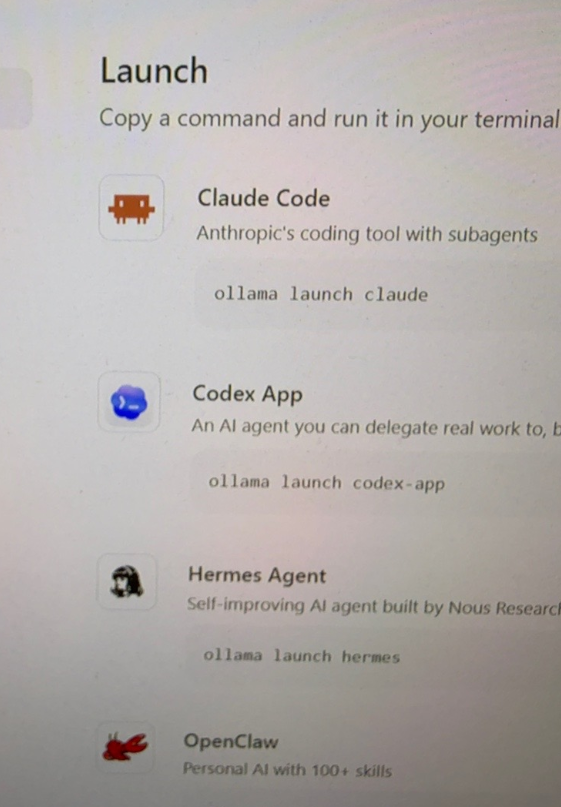
Didn't expect Ollama to ship its own agent launcher, Claude Code included. One less thing to configure by hand.
Note 003 — Ollama Install Footprint
Ollama consumed about 5 GB of disk before any models were downloaded.
Note 004 — Model Downloads Use Layers
Ollama downloads models in layers, similar to how container images work.
Note 005 — Qwen2.5-Coder Behavior
Qwen2.5-Coder:14B is a coding-oriented model. In Open WebUI, it attempted to emit JSON-style tool calls in response to simple conversational questions. This appears to be expected model behavior, not a broken installation.
Important lesson
Coder models are not necessarily ideal as everyday chatbots — they're tuned for code and tool-use patterns, which can leak into casual conversation.Note 006 — Need a Conversational Model
Next step: install a general conversational model, likely qwen3:8b or qwen3:14b, for everyday use in Open WebUI — see Models for the plan.