The AI Lab isn't one machine — it's two nodes, run by two people, tied together over a private mesh network so both sides can see and (eventually) share what the other is running.
Node A — Beelink SER9
The first node to come online (July 2, 2026 — see Build Journal #001). Runs Windows 11, with Ollama serving models locally and Open WebUI as the browser front end. Joined the Tailscale mesh as ai-lab-b.
Node B — GMKtec
Running Linux with Ollama serving a model nicknamed "Gwen." A lightweight custom chat UI ("GwenUI") was also built for it, with a small Vercel serverless proxy reshaping Ollama's API responses.
The Tailscale layer
Tailscale gives both nodes private IP addresses on a shared mesh network (a "tailnet"), so they can reach each other securely without exposing anything to the public internet. This is also what lets a phone reach Open WebUI on Node A from anywhere, not just the home LAN — see the Field Guide's Mobile Access page.
Lesson learned
Two machines on two different home networks can't see each other by IP address alone — that's exactly what Tailscale solves. Both nodes are now confirmed on the same tailnet (rather than relying on port-forwarding or direct SSH across networks) — though Node A briefly ended up on the wrong tailnet before that got sorted out, see Tailscale Account / Tailnet Lessons.Where Claude Code fits #
Claude Code acts as the engineering assistant for the lab itself — installing software, writing documentation, building this very site, and keeping the Build Journal and Engineering Notebook up to date as the lab grows.
As of July 12, 2026, there are two separate Claude Code instances running: one on the everyday HP desktop, and a second installed directly on Node A (ai-lab-b) itself, alongside the Ollama LLM it manages there.
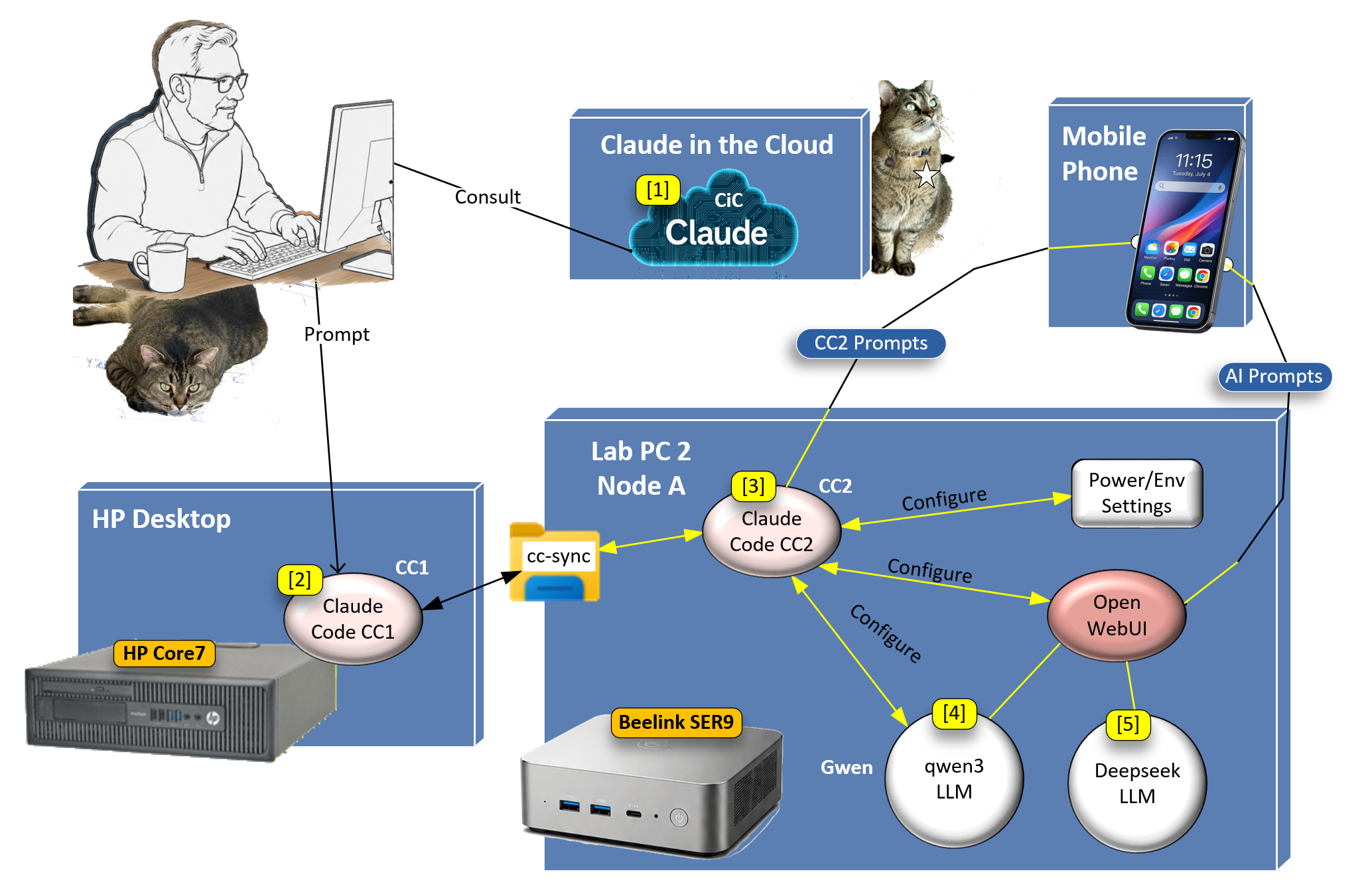
- [1] Claude in the Cloud — single point of AI contact for all lab configuration work. CiC consults with the human operator and passes commands to CC1 and CC2 to implement changes to the environment.
- [2] Claude Code CC1 — runs on the HP Desktop (HP Core7), the "architect" instance used day to day for planning and documentation.
- [3] Claude Code CC2 — runs on Lab PC 2 / Node A (Beelink SER9), configuring Power/Environment Settings and Open WebUI directly on that machine.
- [4] qwen3 LLM — the local model on Node A, served through Open WebUI and reachable from a mobile phone via AI Prompts.
The two instances hand off messages through cc-sync, a plain-text folder shared over OneDrive rather than a live network connection — which is why the diagram labels that link Async, not Sync. Each instance polls the folder on an hourly local loop (plus ad hoc checks on request) and follows the same rule on both sides: read a new file, understand what it's asking, prepare a plan — then stop and wait for a human go-ahead before acting or replying.
Async also matches how the lab actually runs day to day: work flows primarily through Claude Code 1 on the HP desktop — the "architect" assistant for planning and documentation — rather than holding the same conversation twice with two different assistants in real time. Claude Code 2 stays close to Node A itself, checking and adjusting OS-level parameters directly on that machine, and reports back through the shared folder whenever there's something for it to pick up or a status check is needed.
The diagram also shows two paths not covered above. Claude in the Cloud is consulted separately for some work, independent of either local instance. And a mobile phone reaches Node A two distinct ways: AI Prompts to Open WebUI for chatting with the qwen3 LLM directly (see the Field Guide's Mobile Access page), and CC2 Prompts — a live connection straight to Claude Code CC2 itself, using Claude Code's built-in Remote Control feature, set up the same day this diagram was made.