← Part 2: Mobile Access · AI Lab Portal Home
Part 2 proved that mobile access could work: an iPhone could reach Open WebUI on Lab PC 2 through Tailscale and run a local model. Part 3 asks a harder operational question: will that remote access still work after the AI server has been left unattended for hours?
Core distinction
Part 2 = making remote access work.
Part 3 = making remote access reliable.
The goal is not just a successful demo. The goal is an AI Lab node that behaves like infrastructure: reachable when needed, even when nobody has touched the keyboard, mouse, or monitor for a long time.
Goal #
Allow approved devices on the Tailscale tailnet — especially the iPhone — to reach Open WebUI reliably after Lab PC 2 has been unattended for hours.
Known-Good Baseline from Part 2 #
| Server | Lab PC 2 / Beelink SER9 |
|---|---|
| Tailscale node name | ai-lab-b |
| Tailscale IP | 100.115.162.13 |
| Open WebUI port | 8080 |
| iPhone node | iphone171 |
| iPhone Tailscale IP | 100.110.16.81 |
| Default model used for testing | qwen3:8b |
| Primary test URL | http://100.115.162.13:8080 |
Test Log Summary #
Earlier tests included invalid HP-laptop attempts because that machine's Tailscale client was later found to be in NoState. The most useful data came from the iPhone and from local tests on Lab PC 2.
| Test | Client | Result |
|---|---|---|
| 9 | iPhone Chrome | Open WebUI loaded immediately; response completed in 63 seconds; model reported 23 seconds of thinking. |
| 10 | iPhone Chrome | Immediate repeat completed in 71 seconds; model reported 31 seconds of thinking. |
| 11 | iPhone Chrome | One-sentence prompt completed in 40 seconds; model reported 13 seconds of thinking. |
| 13 | Lab PC 2 Chrome | Localhost comparison completed in 44 seconds; model reported 24 seconds of thinking. |
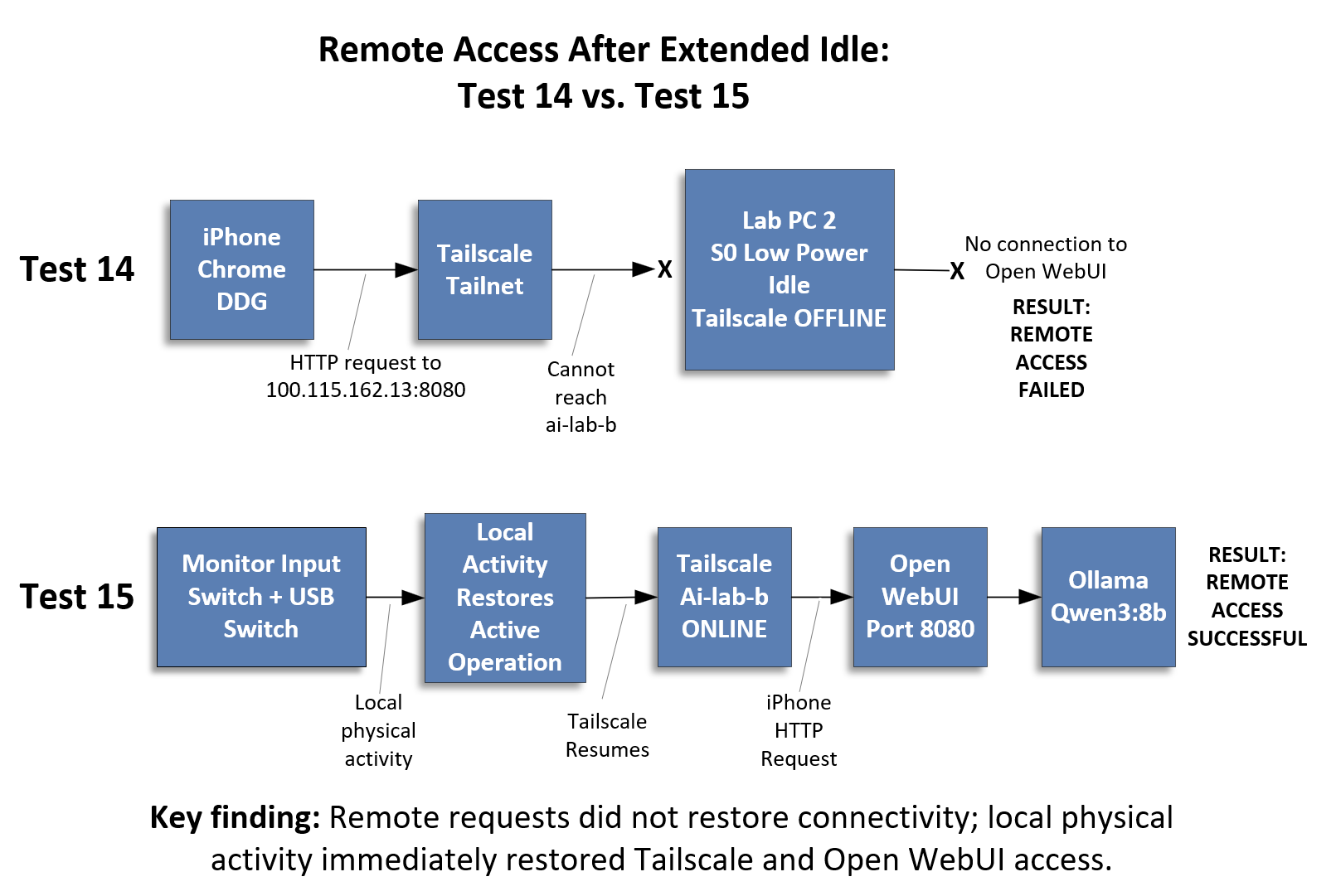
| 14 | iPhone after roughly four hours idle | Failed. Open WebUI timed out and ai-lab-b appeared gray/offline in Tailscale. |
| 15 | iPhone after local wake activity | Success. Tailscale returned immediately, Open WebUI loaded immediately, and the prompt completed in 33 seconds. |
Test 14 — Remote Access After Extended Idle Failed #
After about four hours without local activity on Lab PC 2, the iPhone could not reach Open WebUI at the numeric Tailscale address:
Both iPhone browsers tested timed out. The Tailscale app then showed ai-lab-b as gray/offline. That shifted the diagnosis away from Open WebUI itself: the failure was not merely that port 8080 was slow or that the browser was confused. The Beelink's Tailscale node itself had become unavailable.
Test 15 — Local Activity Restored Access #
To wake Lab PC 2, the monitor input and USB switch were moved from the HP laptop back to the Beelink. No restart was performed. Tailscale was not restarted. Open WebUI and Ollama were not restarted.
The result was immediate:
ai-lab-bchanged from gray/offline to green/online in Tailscale.- The iPhone loaded the Open WebUI login page immediately.
- The prompt “Answer in one sentence only: why do cats purr?” completed in 33 seconds.
- The model reported 10 seconds of thinking.
What This Proves — and What It Does Not Prove #
The evidence strongly suggests that extended low-power idle behavior on Lab PC 2 makes the Tailscale node unreachable. Once the PC is locally awakened, the AI application stack appears to recover normally without restart or reconfiguration.
That does not yet prove the exact Windows power-state transition. It is more careful to say that local physical activity restored active operation than to say we have proven the machine left a specific sleep state.
Windows Power-State Discovery #
Lab PC 2 did not show a traditional Sleep option in the Start menu. Windows confirmed why:
This means the Beelink uses Modern Standby / S0 Low Power Idle rather than classic S3 sleep. That matters because the lab is using this Windows mini-PC as a server, while S0 Low Power Idle is designed primarily for client-style power management.
Post-Recovery Status Snapshot #
After Test 15 restored remote access, the status script showed the application stack was healthy:
| Ollama | Running |
|---|---|
| Open WebUI desktop app | Running |
| Open WebUI server | Reachable locally at 127.0.0.1:8080 |
qwen3:8b | Loaded successfully during warm-up |
| Tailscale | ai-lab-b online; iphone171 online |
| Open Terminal / llama.cpp | Not reachable, but not part of the active Ollama/Open WebUI chat path |
This supports the conclusion that the four-hour failure was not an Open WebUI or Ollama crash. The application stack remained recoverable. The remote-access problem was tied to whether Lab PC 2 stayed reachable through Tailscale while idle.
Working Hypothesis #
Working hypothesis: Lab PC 2 is acting like a desktop client computer, not an always-on server. During extended S0 Low Power Idle, the machine appears to stop maintaining Tailscale availability. Local physical activity restores active operation immediately.
The desired behavior is different:
Next Diagnostic Step #
The next step is to generate a Windows SleepStudy report before changing any power settings:
That report should show when Lab PC 2 entered Modern Standby, how long it remained there, and which devices or services were active during the idle period.
Lessons Learned
- A Tailscale node's visibility on the tailnet is not guaranteed just because the application stack underneath it (Ollama, Open WebUI) is healthy.
- Extended idle time with no local activity on Lab PC 2 correlates with the node going gray/offline in Tailscale, blocking all remote access regardless of app health.
- A single instance of local physical activity was enough to restore full connectivity immediately, with no service restarts required.
- Because recovery required no restart, the underlying application stack was never actually broken — only the node's network reachability was.
powercfg /arevealed the Beelink only supports Modern Standby (S0 Low Power Idle), not classic S3 sleep — a client-oriented power model, not a server one.- A post-recovery status snapshot is a fast way to tell whether an outage was an application failure or a connectivity failure — check both rather than assuming.
- Remote requests alone, from the iPhone, did not wake the machine or restore its Tailscale presence — only local physical activity did.
- Before changing any power settings, capture a
powercfg /sleepstudyreport first, so the actual idle transition is documented rather than assumed.
Likely Long-Term Direction #
The long-term goal is to operate Lab PC 2 like infrastructure. The monitor can turn off, but the computer itself should remain reachable through Tailscale whenever Open WebUI is expected to be available.
- Prevent Lab PC 2 from entering a disruptive low-power idle state.
- Allow the display to turn off while keeping the computer awake.
- Review Wi-Fi adapter power-management settings.
- Review BIOS/firmware Modern Standby options.
- Consider wired Ethernet if available.
- Treat Lab PC 2 as an always-on AI server rather than a normal desktop client.
What's Next
← Part 2: Mobile Access · Part 4: Always-On Server → · AI Lab Portal Home